Redesigning Replays
- Mar 21, 2022
- 1 min read
The replay screen I had was very basic in its uses, and so wanted to find a way to streamline it and be more helpful to the user. I chose to do this with an Expandable Area widget, which provides a Header and Body which expands and contracts when clicked (the same as the headers in the properties panel in UE4). I made a plan for what I wanted the replays screen to show, which went like this:
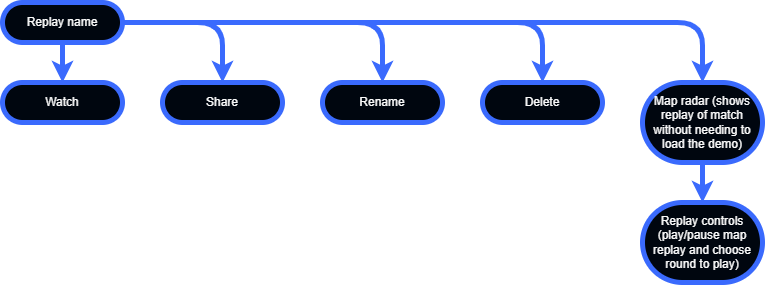
Watch - Loads the demo in the game to spectate
Share - Provides an easy way to send demos to a friend's game instead of copy/pasting the file
Rename - Change the name of the demo file
Delete - Remove the demo file from the user's computer
Map radar - The same radar as seen in the top left of the HUD, but instead loading positional and directional data from the demo.
Creating something like this that works may need two demo files to be saved, one for the "spectatable" replay, and one for just the map/radar, with the latter using a lot less storage space. This map replay will also have limitations, like height. This would be a big problem for maps with multiple, overlapping, height differences, like Nuke, where the bombsites are on top of each other. I created a layout plan for the system in UE4 and sent it to peers, CS:GO players and FPS players alike for feedback.


After asking my peers about the layout, everyone said it was clear and easy to understand, which bode well for my ability to design interfaces.


Comments